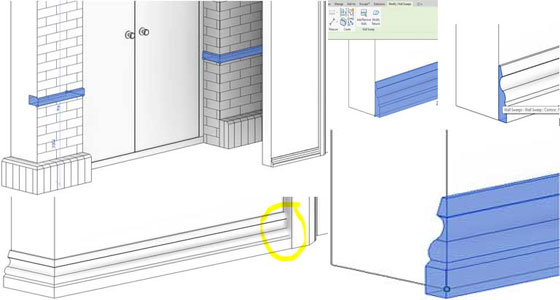
Wrapping Revit Wall Sweeps
After placing a wall sweep, it could be returned its end back toward the wall. This procedure is also available for wall reveals.
The procedure works like:
� In a 3D view, at first select the wall sweep segment.
� Then Click on Modify. Wall Sweeps tab> Wall Sweep panel>Modify Returns. The cursor will now become a scalpel, and then pick the end profile of the sweep to extend the wrap.
� Next select Return and enter a value for Angle.
� This will extend the sweep and gives a blue node that can be dragged to the required position.
� Highlight the wall sweep end.
� Then click to apply the new return value.
After changing the return, the end can be dragged and swept to extend the return. The end of the sweeps can be edited at door frame intersections.